Quickstart
Using flags
You can start the app without passing flags or parameters; an interactive command prompt will ask for the connection details.

Otherwise, you can explicitly include the connection details using multiple parameters:
dblab --host localhost --user myuser --db users --pass password --ssl disable --port 5432 --driver postgres --limit 50
dblab --db path/to/file.sqlite3 --driver sqlite
Connection URL scheme is also supported:
dblab --url postgres://user:password@host:port/database?sslmode=[mode]
dblab --url mysql://user:password@tcp(host:port)/db
dblab --url file:test.db?cache=shared&mode=memory
If you're using PostgreSQL or Oracle, you have the option to define the schema you want to work with. The --schema flag is optional: if omitted, dblab will display all schemas the connected user has access to in the sidebar tree. If provided, only that specific schema will be shown.
dblab --host localhost --user myuser --db users --pass password --schema myschema --ssl disable --port 5432 --driver postgres --limit 50
dblab --url postgres://user:password@host:port/database?sslmode=[mode] --schema myschema
dblab --host localhost --user user2 --db FREEPDB1 --pass password --port 1521 --driver oracle --limit 50 --schema user1
dblab --url 'oracle://user2:password@localhost:1521/FREEPDB1' --schema user1
For PostgreSQL, the schema can also be set directly in the connection URL with the search_path query parameter, instead of passing --schema alongside it:
dblab --url 'postgres://user:password@localhost:5432/database?sslmode=disable&search_path=myschema'
You can use the --readonly flag to open a connection in read-only mode, preventing any write operations:
dblab --host localhost --user myuser --db users --pass password --ssl disable --port 5432 --driver postgres --limit 50 --readonly
As requested in #125, support for MySQL/MariaDB sockets was integrated.
dblab --url "mysql://user:password@unix(/path/to/socket/mysql.sock)/dbname?charset=utf8"
dblab --socket /path/to/socket/mysql.sock --user user --db dbname --pass password --ssl disable --port 5432 --driver mysql --limit 50
For more information about the available flags, check the Usage section.
Using a config file
default: the first configuration under the database field.
dblab --config
dblab --config --cfg-name "prod"
.dblab.yaml example:
database:
  - name: "test"
    host: "localhost"
    port: 5432
    db: "users"
    password: "password"
    user: "postgres"
    driver: "postgres"
    # optional for postgres and oracle
    # if omitted, all accessible schemas are shown
    schema: "myschema"
    # optional: set to true to force a read-only session
    readonly: true
  - name: "prod"
    # example endpoint
    host: "mydb.123456789012.us-east-1.rds.amazonaws.com"
    port: 5432
    db: "users"
    password: "password"
    user: "postgres"
    schema: "public"
    driver: "postgres"
  - name: "oracle"
    host: "localhost"
    port: 1521
    db: "FREEPDB1"
    schema: "user1"
    password: "password"
    user: "user2"
    driver: "oracle"
    ssl: "enable"
    wallet: "path/to/wallet"
    ssl-verify: true
# should be greater than 0, otherwise the app will error out
limit: 50
Or for SQLite:
database:
  - name: "prod"
    db: "path/to/file.sqlite3"
    driver: "sqlite"
Only the host, ssl, and schema fields are optional. host defaults to 127.0.0.1, ssl defaults to disable. The schema field is only applicable to PostgreSQL and Oracle; if omitted, all accessible schemas are shown.
Using connection profiles
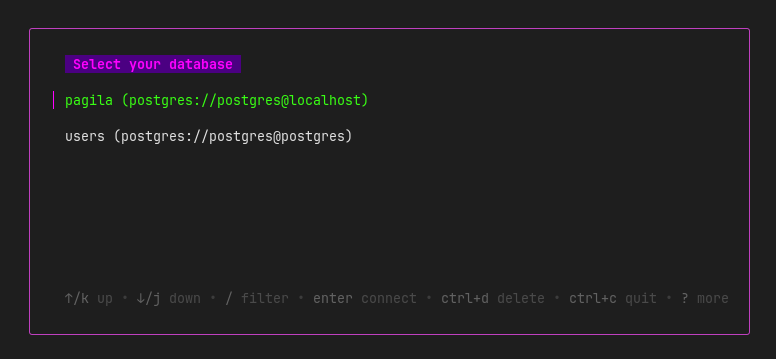
You can save a connection as a named profile for later reuse. The database password and SSH password (if applicable) are stored securely in the OS keyring:
dblab --host localhost --user myuser --db users --pass password --ssl disable --port 5432 --driver postgres --limit 50 --save-as myprofile
Then reconnect without typing credentials again:
dblab connect